Examples
Showcase: larger demos
The showcase/ track combines several capabilities at once (remote LLMs, speech, distributed compute, CI/CD) into larger demos, without stopping to explain every concept along the way.
| Example | What it shows | Needs beyond installing Mélodium |
|---|---|---|
| Smart LLM Router | A JavaScript routing function sends each prompt to the cheapest LLM tier that can handle it | an LLM provider API key |
| AI Voice Assistant | Local speech-to-text, a remote LLM, and text-to-speech chained across two entrypoints (chat and voice) | an LLM provider API key; voice also needs an ElevenLabs key and a microphone |
| CI Pipeline | A three-stage CI pipeline (build, test, package) running entirely on provisioned cloud containers | a Mélodium Services API token, or a local podman/docker compose setup |
| CI Failure Triage | CI step output classified by a small JS function, with only genuine failures sent to an LLM for diagnosis | a Mélodium Services API token and an LLM provider API key |
| Distributed LLM Cluster | An HTTP front-end that provisions a remote worker on demand to run the LLM, keeping ml off the front-end entirely | a Mélodium Services API token and an LLM provider API key |
Learning path: the tutorial track
Create a file named hello-world.mel, and write this code:
#!/usr/bin/env melodium
#! name = hello_world
#! version = 0.1.0
#! require = std:0.11.*

use std/engine/util::startup
use std/engine/log::logInfoMessage

treatment main() {
    startup()
    logInfoMessage(message = "Hello World!")

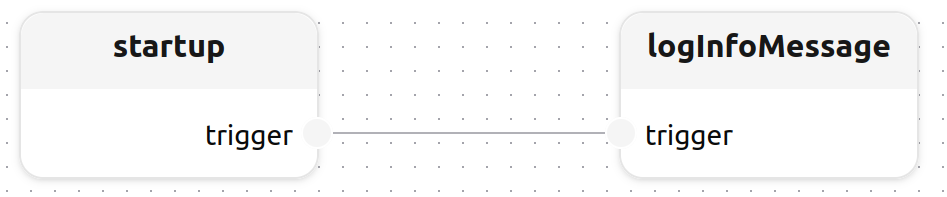
    startup.trigger -> logInfoMessage.trigger
}
Then run it using melodium run hello-world.mel.
$ melodium run hello-world.mel
[2012-12-21T01:32:45.678Z] info: info: Hello World!
That single file is as far as inline snippets go. Real Mélodium projects live in a directory with a Compo.toml, and the best way to learn the language from there is the tutorial/ track in the Mélodium repository: eleven short, self-contained steps, each introducing one or two new concepts, in increasing order of difficulty. Clone the repository to run them:
git clone https://github.com/melodium-tech/melodium.git
cd melodium/examples/tutorial
Each step is its own directory. Run a step from inside its own directory, because several of them read or write files relative to the current working directory:
cd 01_hello_melodium
melodium run Compo.toml [arguments...]| Step | Introduces | Needs beyond installing Mélodium |
|---|---|---|
| 01: Hello, Mélodium | Treatments & connections, Block<T> vs Stream<T>, functions, startup() | nothing |
| 02: Flow & Generics | Generic treatments, std/flow combinators, arithmetic & comparison | nothing |
| 03: Text & Files | File I/O, regular expressions, text composition | nothing |
| 04: JSON Toolkit | Parsing & validating JSON, Option unwrapping | nothing |
| 05: HTTP Client | Calling a remote HTTP API, telling network failure from application error | internet access |
| 06: HTTP Server API | The HttpServer model, routing, the @HttpRequest context | a free TCP port and curl |
| 07: SQL CRUD API | A SqlPool model shared across requests, combined with an HTTP server | a reachable PostgreSQL database |
| 08: JavaScript Transform | The JavaScriptEngine model, transforming structured data with JS | nothing |
| 09: Process Pipeline | Running an external command as a treatment, streaming through its stdin/stdout | the sort command in PATH |
| 10: Distributed Computation | The distrib package: running a treatment on another engine | a second Mélodium engine (melodium dist) |
| 11: Signed Webhooks | Secret<string> parameters, verifying HMAC signatures and tokens with crypto, secret request headers | a free TCP port, curl and openssl |
Every example, tutorial or showcase, is a self-contained Mélodium project (Compo.toml + one or more .mel files) with its own README explaining what it does and why it is built the way it is. Run any of them the same way:
melodium run <example-dir>/Compo.toml [entrypoint] [-- --arg value …]See the examples README for the full capability map (which package demonstrates what) and a note on how each example was verified.