Chat vision
Envoie une URL d’image avec une question à un LLM capable de vision (GPT-4o) et retourne la description. Deux points d’entrée : main pour un appel CLI unique, et server pour un serveur HTTP acceptant des requêtes JSON.
Exécution
CLI one-shot :
melodium run 12_vision_chat/Compo.toml \
  --image_url "https://example.com/photo.jpg" \
  --question  "What do you see?" \
--openai_key sk-...openai_key est une clé d’API OpenAI .
Serveur HTTP :
melodium run 12_vision_chat/Compo.toml server -- --openai_key sk-... --port 8080$ curl -X POST http://127.0.0.1:8080/describe \
-H "Content-Type: application/json" \
-d '{"url":"https://example.com/photo.jpg","question":"Describe this image."}'
L'image montre un…Fonctionnement
Les deux points d’entrée instancient le même modèle Vision, un RemoteLlm configuré pour GPT-4o avec un system prompt d’analyste d’image :
model Vision(const openai_key: string) : RemoteLlm {
    backend     = "openai"
    api_key     = |wrap<string>(openai_key)
    base_url    = ""
    model       = "gpt-4o"
    system      = "You are an expert image analyst. Describe images clearly and in detail."
    max_tokens  = |wrap<u64>(512)
    temperature = _
    top_p       = _
    timeout     = _
}
main : point d’entrée CLI
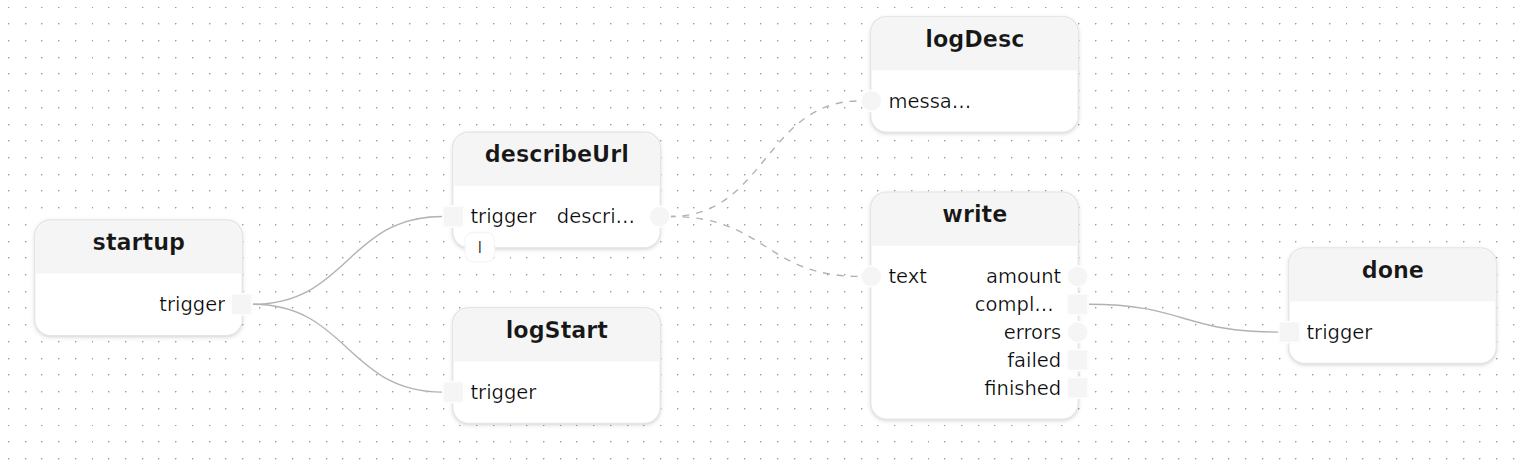
main déclenche describeUrl une fois au démarrage avec l’URL de l’image et la question comme paramètres const, puis envoie la description en fan-out vers le journal et un fichier local :
treatment main(
    const image_url:  string,
    const question:   string = "What do you see in this image?",
    const output:     string = "description.txt",
    const openai_key: string
)
  model llm: Vision(openai_key=openai_key)
{
    describeUrl[llm=llm](image_url=image_url, question=question)
    startup.trigger -> describeUrl.trigger

    logDesc: logInfos(label="description")
    write:   writeTextLocal(path=output)

    describeUrl.description --> logDesc.messages
    describeUrl.description --> write.text
}
describeUrl[llm] construit une StringMap avec les valeurs url et question, la convertit en flux, et utilise format pour construire la chaîne du prompt sans concaténation de chaînes dans le dataflow :
treatment describeUrl[llm: RemoteLlm](const image_url: string, const question: string)
  input  trigger:     Block<void>
  output description: Stream<string>
{
    emitParams:   emit<StringMap>(value=|smInsert(|smInsert(|map([]), "url", image_url), "q", question))
    streamParams: stream<StringMap>()

    Self.trigger -> emitParams.trigger,emit -> streamParams.block,stream -> fmt.entries

    fmt: format(format="Please analyse the image at this URL: {url}\n\nQuestion: {q}")

    doChat: chat[llm=llm]()
    fmt.formatted -> doChat.prompt

    doChat.response -> Self.description
}
server : point d’entrée HTTP
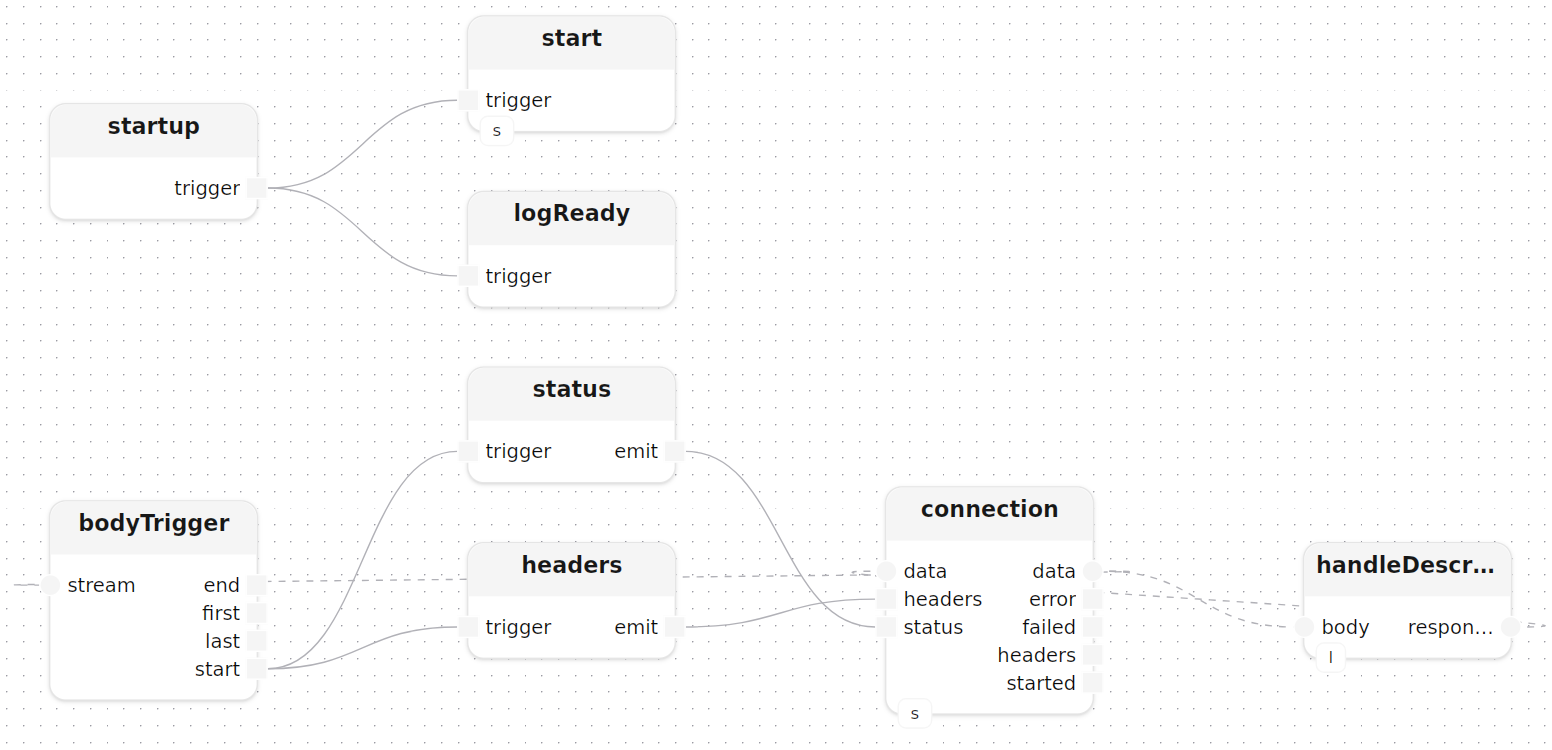
server démarre un modèle HttpServer et écoute les requêtes POST /describe :
treatment server(
    const openai_key: string,
    const port:       u16 = 8080
)
  model server: HttpServer(host=|from_ipv4(|localhost_ipv4()), port=port)
  model llm:    Vision(openai_key=openai_key)
{
    start[http_server=server]()
    connection[http_server=server](method=|post(), route="/describe")

    handleDescribe[llm=llm]()
    connection.data -> handleDescribe.body,response -> connection.data
}
Le sous-traitement handleDescribe utilise un modèle JavaScriptEngine (PromptBuilder) pour parser le corps JSON et construire le prompt dynamiquement :
model PromptBuilder() : JavaScriptEngine {
    code = ${{function buildPrompt(body) {
        var obj = typeof body === 'string' ? JSON.parse(body) : body;
        var url      = (obj.url      || '').toString();
        var question = (obj.question || 'What do you see in this image?').toString();
        return 'Please analyse the image at this URL: ' + url + '\n\nQuestion: ' + question;
    }
}}
}
C’est plus flexible qu’une chaîne de format fixe quand la structure d’entrée peut varier. Le corps de la requête traverse decode, le parsing JSON, le constructeur de prompt JS, puis revient à une chaîne avant d’atteindre chat :
treatment handleDescribe[llm: RemoteLlm]()
  model promptBuilder: PromptBuilder()
  input  body:     Stream<byte>
  output response: Stream<byte>
{
    Self.body -> decode.data,text -> toJson.text,json -> unwrapBody.option,value -> buildPrompt.value,result -> unwrapPrompt.option,value -> promptStr.value,into -> promptOr.option,value -> doChat.prompt

    doChat: chat[llm=llm]()

    doChat.response -> encode.text,data -> Self.response
}
tryToString<Json>() extrait une chaîne simple du résultat JSON avec un retour Option<string>, que unwrapOr<string>(default="") résout ensuite en repli sûr. Le modèle PromptBuilder est compilé une seule fois au démarrage et partagé entre toutes les requêtes.
Dépendances
[dependencies]
std        = "0.10.2"  # flux de base, journalisation, structures de données
fs         = "0.10.2"  # lecture/écriture de fichiers locaux
http       = "0.10.2"  # serveur et client HTTP
net        = "0.10.2"  # utilitaires d'adresses IP
json       = "0.10.2"  # parsing et sérialisation JSON
encoding   = "0.10.2"  # encodage / décodage UTF-8
javascript = "0.10.2"  # moteur JavaScript embarqué
ml         = "0.10.2"  # inférence LLM, STT, TTS et modèles locaux