SQL User API
A minimal REST API backed by SQLite (or PostgreSQL). The database connection pool and the HTTP server are both declared as models, initialised once and shared across all concurrent request tracks.
Running
melodium run 03_sql_user_api/Compo.toml
# or with PostgreSQL:
melodium run 03_sql_user_api/Compo.toml --db_url postgres://user:pass@localhost/mydb
$ curl http://127.0.0.1:8080/users
OK
$ curl -X POST http://127.0.0.1:8080/users -d '{"name":"Alice","email":"alice@example.com"}'
{"name":"Alice","email":"alice@example.com"}How it works
Two models are declared at the top of main:
model db:     AppDb(db_url=db_url)
model server: HttpServer(host=|from_ipv4(|localhost_ipv4()), port=port)
Both are instantiated once. AppDb wraps SqlPool with configurable min/max connections; HttpServer accepts all incoming requests and dispatches them to whichever sub-treatment registered a matching route.
Startup sequence
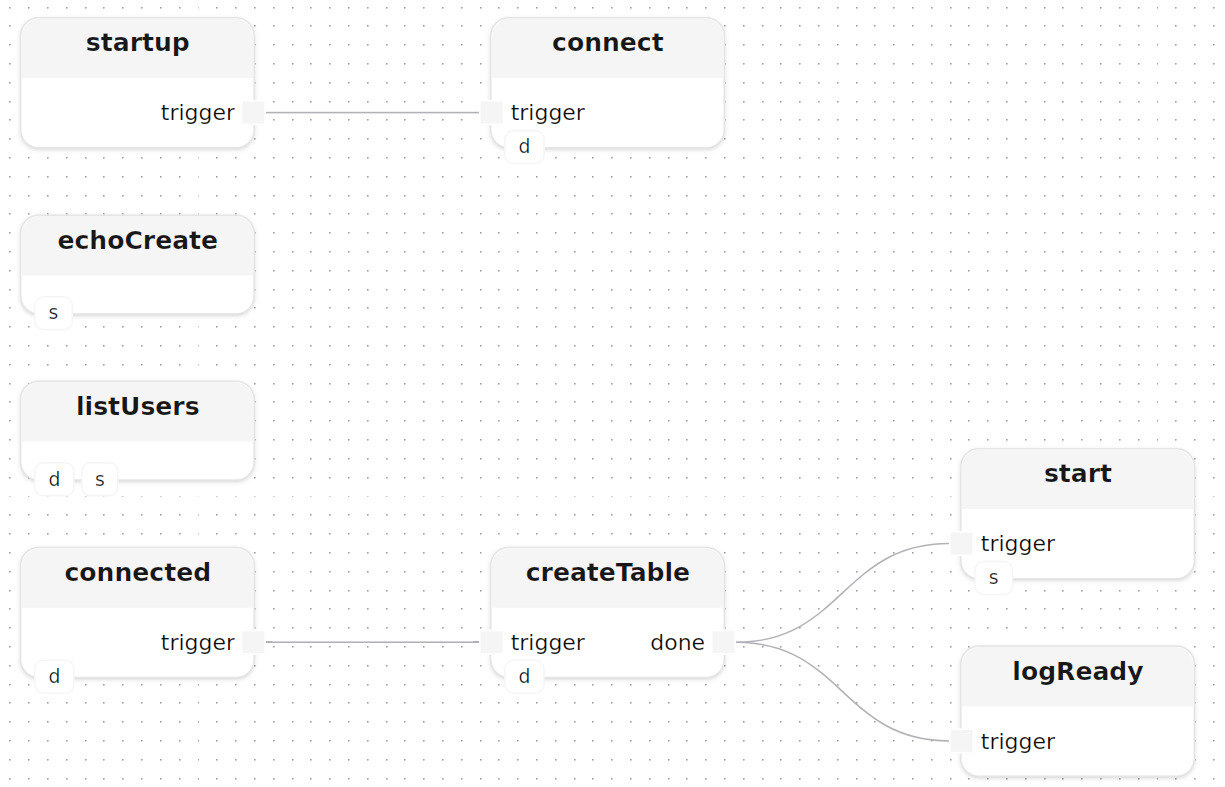
The connections in main enforce a strict startup order: connect opens the pool, connected fires once it is up, triggering createTable. Only after createTable.done does the HTTP server start, ensuring the schema exists before any request arrives:
treatment main(
    const db_url: string = "sqlite://users.db",
    const port:   u16    = 8080
)
  model db:     AppDb(db_url=db_url)
  model server: HttpServer(host=|from_ipv4(|localhost_ipv4()), port=port)
{
    startup()
    connect[sql_pool=db]()
    startup.trigger -> connect.trigger

    connected[sql_pool=db]()
    createTable[db=db]()
    connected.trigger -> createTable.trigger

    start[http_server=server]()
    logReady: logInfoMessage(label="server", message="SQL user API ready")
    createTable.done -> start.trigger
    createTable.done -> logReady.trigger

    listUsers[db=db, http_server=server]()
    echoCreate[http_server=server]()
}
createTable runs a CREATE TABLE IF NOT EXISTS via executeRaw, then converts the affected-rows count into a Block<void> completion signal:
treatment createTable[db: SqlPool]()
  input  trigger: Block<void>
  output done:    Block<void>
{
    executeRaw[sql_pool=db](sql="CREATE TABLE IF NOT EXISTS users (id INTEGER PRIMARY KEY AUTOINCREMENT, name TEXT NOT NULL, email TEXT NOT NULL)")
    checkAffected: check<u64>()
    emitDone:      emit<void>(value=_)

    Self.trigger -> executeRaw.trigger,affected -> checkAffected.value,check -> emitDone.trigger,emit -> Self.done
}
Route handlers
listUsers and echoCreate each call connection[http_server=server](method=…, route=…) to register their route. They run concurrently and independently; Mélodium creates a new track for each incoming connection automatically.
The bodyTrigger: trigger<byte>() pattern converts the incoming Stream<byte> body into a Block<void> start event. Status, headers, and body processing are all driven from that single signal in parallel:
treatment listUsers[db: SqlPool, http_server: HttpServer]() {
    connection[http_server=http_server](method=|get(), route="/users")

    status:      emit<HttpStatus>(value=|ok())
    headers:     emit<StringMap>(value=|smap([]))
    bodyTrigger: trigger<byte>()

    connection.data -> bodyTrigger.stream,start --> status.trigger,emit  -> connection.status
                       bodyTrigger.start --------> headers.trigger,emit -> connection.headers

    queryUsers[db=db]()
    bodyTrigger.start -> queryUsers.trigger

    logRows: logDataInfos<Map>(label="users")
    queryUsers.rows -> logRows.data

    okMsg:     emit<string>(value="OK\n")
    streamMsg: stream<string>()
    encode()
    bodyTrigger.start -> okMsg.trigger,emit -> streamMsg.block,stream -> encode.text,data -> connection.data
}
Fan-out is achieved by writing two separate connections from the same output. queryUsers wraps the sqlFetch call, streaming result rows as Stream<Map>:
treatment queryUsers[db: SqlPool]()
  input  trigger: Block<void>
  output rows:    Stream<Map>
{
    emitBind: emit<Map>(value=|map([]))
    sqlFetch[sql_pool=db](sql="SELECT id, name, email FROM users ORDER BY id", bindings=[])

    Self.trigger -> emitBind.trigger,emit -> sqlFetch.bind,data -> Self.rows
}
echoCreate decodes the request body as JSON and echoes it back as plain text:
treatment echoCreate[http_server: HttpServer]() {
    connection[http_server=http_server](method=|post(), route="/users")

    status:  emit<HttpStatus>(value=|ok())
    headers: emit<StringMap>(value=|smap([]))
    bodyTrigger: trigger<byte>()

    connection.data -> bodyTrigger.stream,start --> status.trigger,emit  -> connection.status
                       bodyTrigger.start --------> headers.trigger,emit -> connection.headers

    decode()
    toJson()
    unwrapBody: unwrapOr<Json>(default=|null())
    toString<Json>()
    encode()

    connection.data -> decode.data,text -> toJson.text,json -> unwrapBody.option,value -> toString.value,into -> encode.text,data -> connection.data
}
Dependencies
[dependencies]
std      = "0.10.2"  # core flows, logging, data structures
http     = "0.10.2"  # HTTP server and client
net      = "0.10.2"  # IP address helpers
json     = "0.10.2"  # JSON parsing and serialisation
sql      = "0.10.2"  # SQL connection pool and queries
encoding = "0.10.2"  # UTF-8 encode / decode