Vision Chat
Sends an image URL with a question to a vision-capable LLM (GPT-4o) and returns the description. Two entrypoints: main for a single one-shot CLI call, and server for an HTTP server accepting JSON requests.
Running
One-shot CLI:
melodium run 12_vision_chat/Compo.toml \
  --image_url "https://example.com/photo.jpg" \
  --question  "What do you see?" \
--openai_key sk-...openai_key is an OpenAI API key.
HTTP server:
melodium run 12_vision_chat/Compo.toml server -- --openai_key sk-... --port 8080$ curl -X POST http://127.0.0.1:8080/describe \
-H "Content-Type: application/json" \
-d '{"url":"https://example.com/photo.jpg","question":"Describe this image."}'
The image shows a…How it works
Both entrypoints instantiate the same Vision model, a RemoteLlm configured for GPT-4o with an image-analyst system prompt:
model Vision(const openai_key: string) : RemoteLlm {
    backend     = "openai"
    api_key     = |wrap<string>(openai_key)
    base_url    = ""
    model       = "gpt-4o"
    system      = "You are an expert image analyst. Describe images clearly and in detail."
    max_tokens  = |wrap<u64>(512)
    temperature = _
    top_p       = _
    timeout     = _
}main: CLI entrypoint
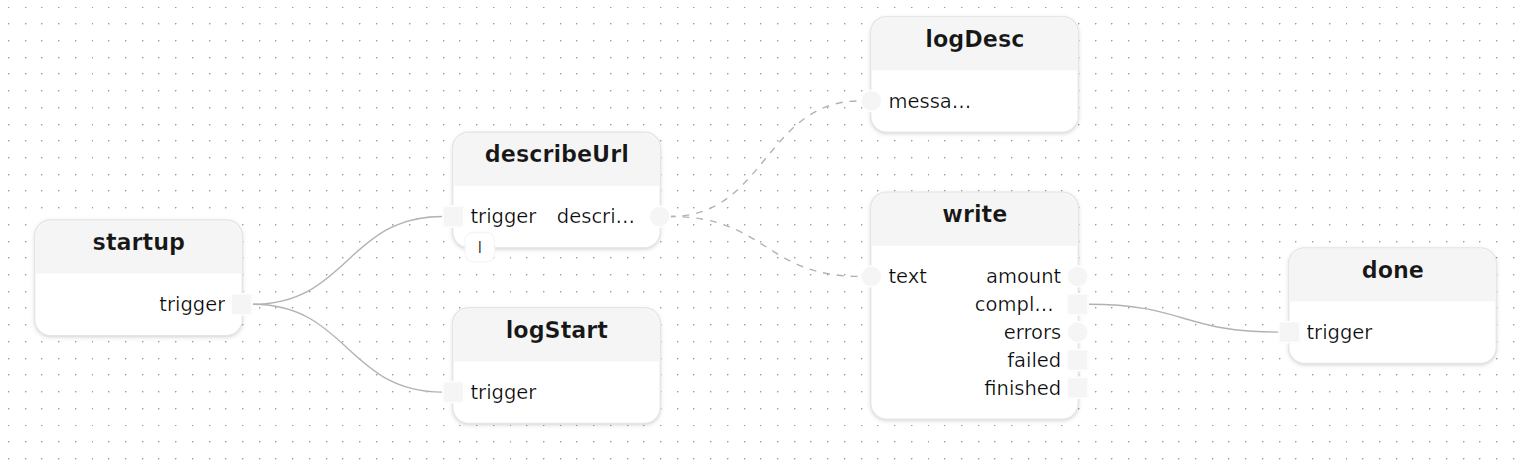
main fires describeUrl once at startup with the image URL and question as const parameters, then fans the description out to the log and a local file:
treatment main(
    const image_url:  string,
    const question:   string = "What do you see in this image?",
    const output:     string = "description.txt",
    const openai_key: string
)
  model llm: Vision(openai_key=openai_key)
{
    describeUrl[llm=llm](image_url=image_url, question=question)
    startup.trigger -> describeUrl.trigger

    logDesc: logInfos(label="description")
    write:   writeTextLocal(path=output)

    describeUrl.description --> logDesc.messages
    describeUrl.description --> write.text
}
describeUrl[llm] builds a StringMap with the url and question values, converts it to a stream, and uses format to build the prompt string with no string concatenation in the dataflow:
treatment describeUrl[llm: RemoteLlm](const image_url: string, const question: string)
  input  trigger:     Block<void>
  output description: Stream<string>
{
    emitParams:   emit<StringMap>(value=|smInsert(|smInsert(|map([]), "url", image_url), "q", question))
    streamParams: stream<StringMap>()

    Self.trigger -> emitParams.trigger,emit -> streamParams.block,stream -> fmt.entries

    fmt: format(format="Please analyse the image at this URL: {url}\n\nQuestion: {q}")

    doChat: chat[llm=llm]()
    fmt.formatted -> doChat.prompt

    doChat.response -> Self.description
}server: HTTP entrypoint
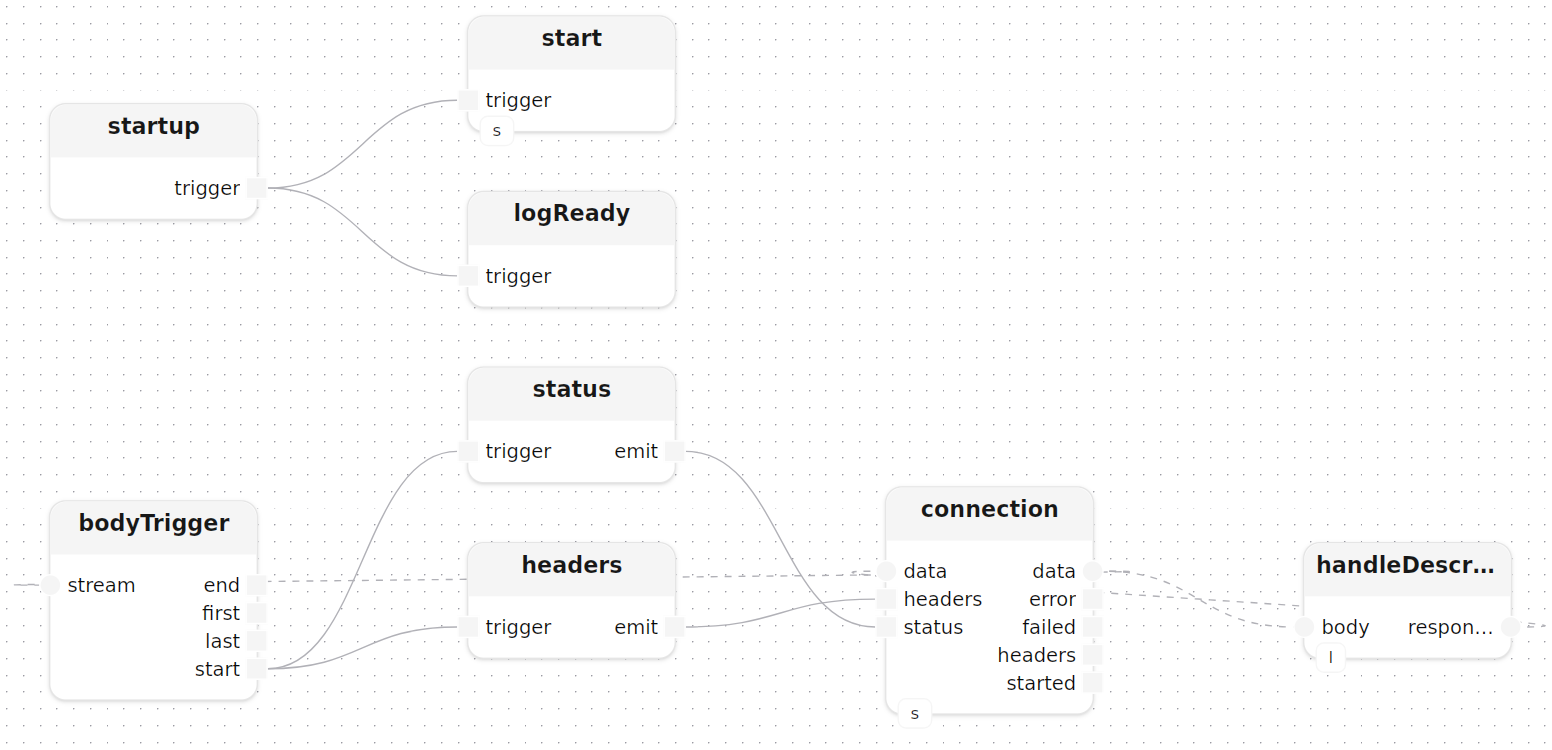
server starts an HttpServer model and listens for POST /describe:
treatment server(
    const openai_key: string,
    const port:       u16 = 8080
)
  model server: HttpServer(host=|from_ipv4(|localhost_ipv4()), port=port)
  model llm:    Vision(openai_key=openai_key)
{
    start[http_server=server]()
    connection[http_server=server](method=|post(), route="/describe")

    handleDescribe[llm=llm]()
    connection.data -> handleDescribe.body,response -> connection.data
}
The handleDescribe sub-treatment uses a JavaScriptEngine model (PromptBuilder) to parse the JSON body and build the prompt dynamically:
model PromptBuilder() : JavaScriptEngine {
    code = ${{function buildPrompt(body) {
        var obj = typeof body === 'string' ? JSON.parse(body) : body;
        var url      = (obj.url      || '').toString();
        var question = (obj.question || 'What do you see in this image?').toString();
        return 'Please analyse the image at this URL: ' + url + '\n\nQuestion: ' + question;
    }
}}
}
This is more flexible than a fixed format string when the input structure may vary. The request body flows through decode, JSON parsing, the JS prompt builder, and back to a string before reaching chat:
treatment handleDescribe[llm: RemoteLlm]()
  model promptBuilder: PromptBuilder()
  input  body:     Stream<byte>
  output response: Stream<byte>
{
    Self.body -> decode.data,text -> toJson.text,json -> unwrapBody.option,value -> buildPrompt.value,result -> unwrapPrompt.option,value -> promptStr.value,into -> promptOr.option,value -> doChat.prompt

    doChat: chat[llm=llm]()

    doChat.response -> encode.text,data -> Self.response
}
tryToString<Json>() extracts a plain string from the JSON result with an Option<string> return, which unwrapOr<string>(default="") then resolves to a safe fallback. The PromptBuilder model is compiled once at startup and shared across all request tracks.
Dependencies
[dependencies]
std        = "0.10.2"  # core flows, logging, data structures
fs         = "0.10.2"  # local file I/O
http       = "0.10.2"  # HTTP server and client
net        = "0.10.2"  # IP address helpers
json       = "0.10.2"  # JSON parsing and serialisation
encoding   = "0.10.2"  # UTF-8 encode / decode
javascript = "0.10.2"  # embedded JavaScript engine
ml         = "0.10.2"  # LLM, STT, TTS and local model inference